
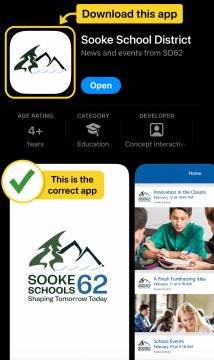
Alongside our updated websites, we launched a new district mobile app to make it easier for families with children at multiple schools to stay connected. Families can now use one app for the entire district. Please delete any old individual school apps from your device.
The app will also serve as our primary method of notifying families when an event significantly impacts school operations, such as a school closure. This change reflects how families increasingly use mobile devices as their primary number and helps address automated calls being screened, blocked, or sent to voicemail by carriers, device settings, and spam filters. Push notifications through the district app provide a more direct and timely way to alert families when important information is available.
For significant operational disruptions, information will also be shared through other district communication channels to help ensure families have multiple ways to access information.
How to Download the District App
Download the app directly from your child’s school website. From the homepage, scroll to the bottom of the page, underneath the footer, there are buttons to:
- Download on the App Store for Apple devices.
- Get it on Google Play for Android devices.
Tap the button for your device and follow the prompts to download the app.
You can also search for “Sooke School District” in your device’s app store or visit our website.
*If you are having an issue with your password, please make sure you download the app directly from your child’s school website instead. You can find the download buttons in the bottom-right corner of the website homepage, just below the footer. Depending on your phone or the version of your app store, searching for the app directly may bring up an older district or school app. Downloading it through your child’s school website will help ensure you have the correct version. The new app does not require a password.
Please note: Concept Interactive Inc. provides the official Sooke School District app
Set Up Your App
When you open the app for the first time, you will be guided through a quick setup to choose the schools and updates you want to follow.
Step 1: Find Your School
Browse the available schools.
Step 2: Choose What You Want to Follow
Select the schools you want to receive information from. You can follow one or more schools, and your selections can be updated at any time.
Step 3: Allow Notifications
Turn on notifications so you do not miss important updates from the district and the schools you follow.
To check your notification settings:
- Open the Sooke School District app.
- Tap Menu.
- Select Settings.
- Make sure Notifications are turned on.
- If prompted by your phone, select Allow.
Note About Following Secondary Schools
If you follow your child’s secondary school in the app, you may receive student-focused notifications about events, activities, and other updates. Because app communications are intended for both students and families, some notifications may not be relevant to parents/guardians.
At the elementary and middle school levels, push notifications are not intended specifically for students, as personal digital devices must remain stored away throughout the school day except when permitted for instructional, medical, or accessibility purposes.
Our new websites and app are new to staff. We appreciate your patience and support as everyone gets familiar with these new tools, and we continue to improve how we use them.
If you experience a technical issue with the district app itself, please email info@sd62.bc.ca with a description of the problem and if possible, a screenshot so that we can better understand the issue and assist you. Questions about your school, including school news or events, should continue to be directed to your child’s school.