
Available for Apple iOS and Android devices, the app gives parents and caregivers convenient, real-time access to school news, calendars, important announcements, emergency alerts, and other updates.
With everything in one place, the app helps ensure you receive important school information quickly and directly on your mobile device.
Please note that individual school apps are no longer in use.
How to Download the District App
Download the app directly from your child’s school website. On the homepage, scroll all the way to the bottom of the page, you’ll find buttons to download the app on your mobile device:
- Download on the App Store for Apple devices
- Get it on Google Play for Android devices
Simply tap the button for your device and follow the prompts to download the app.
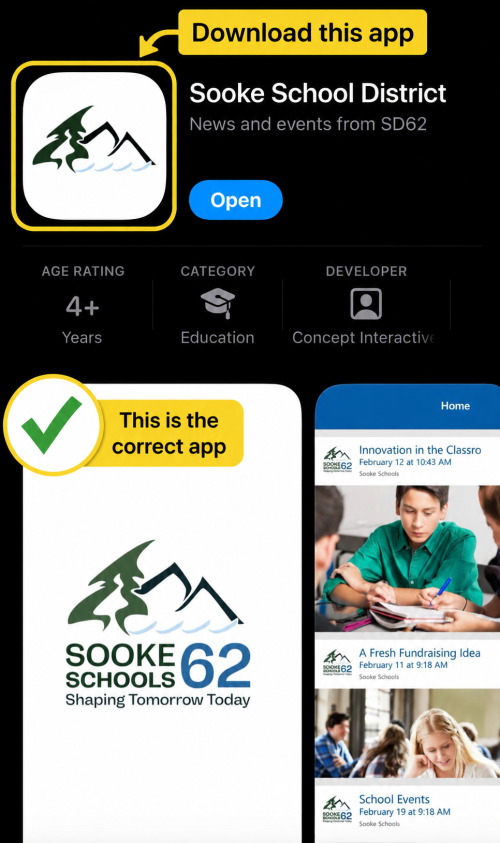
You can also search for “Sooke School District” in your device’s app store and download the app from there.
Set Up Your App
When you open the app for the first time, you’ll be guided through a quick setup so you can choose the updates you want to receive.
Step 1: Find Your School or Location
Browse the available school locations.
Step 2: Choose What You Want to Follow
Select the schools you want to receive information from.
You can update these selections later if your preferences change.
Allow Notifications
Turn on notifications so you don't miss important updates from the district and the schools you follow.
To check your notification settings:
- Open the Sooke School District app.
- Tap Menu.
- Select Settings.
- Make sure Notifications are turned on.
- If prompted by your phone, select Allow.
Once enabled, notifications can alert users to important information and updates.
Stay Up to Date
When you open the app, you’ll see the latest information from the district and schools you follow, all in one convenient place.
You can use the app to find:
- Latest news and announcements
- Important messages
- School calendars and upcoming events
- Notices and reminders
- School information and contact details
- Helpful links and website updates
The app makes it easy to stay connected and keep up with what’s happening at your child’s school.
If you experience a technical issue with the district app itself, please email info@sd62.bc.ca with a description of the problem and if possible, a screenshot so that we can better understand the issue and assist you. Questions about your school, including school news or events, should continue to be directed to your child’s school.